
SAP Migrations to AWS Cloud using Cloud Endure Migration Tool
Enterprises migrating SAP workloads to AWS are looking for an as-is migration solution that is readily available. Earlier, enterprises used the traditional method of SAP backup and restore for migration or AWS-native tools such as AWS Server Migration Service to perform this type of migration. CloudEndure Migration is a new AWS-native migration tool for SAP customers looking for assistance with cloud migration services. It is a SaaS service offering from AWS to migrate workloads from any source (physical, virtual, or private/public cloud) to AWS, from one AWS region to another AWS account, and across different AWS accounts. Know more about how CloudEndure enhances our cloud migration services.
Enterprises looking to host a large number of SAP systems onto AWS can use CloudEndure Migration without worrying about compatibility, performance disruption or long cutover windows. You can perform any re-architecture after your systems start running on AWS.
Explore why Sify is ranked among the leading cloud managed services providers globally and our proven expertise in cloud migration services. Click here.
SAP to AWS Cloud Migration Services – Solution Overview
CloudEndure Migration simplifies, expedites and reduces the cost of such migrations by offering a highly automated as-is migration solution. This blog demonstrates how easy it is to set up CloudEndure Migration and the steps involved in migrating SAP systems from source to AWS environment.
Learn more about our cloud migration services and cloud managed services. Click here.
CloudEndure Migration Architecture
The following diagram shows the CloudEndure Migration architecture for migrating SAP systems.
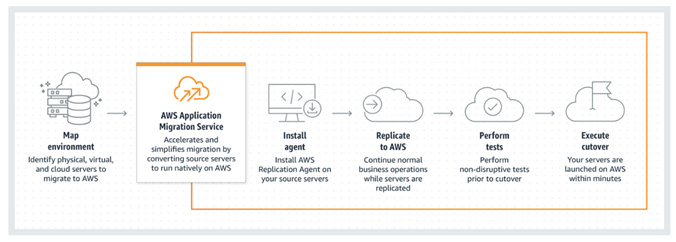
Major steps for this migration are as below:
- Agent Installation
- Continuous Replication
- Testing and Cutover
CloudEndure helps you overcome the following migration challenges effectively:
- Diverse infrastructure and OS type
- Legacy application
- Complex database
- Busy continuously changing workloads
- Machine compatibility issues
- Expensive cloud skills required
- Downtime and performance disruptions
- Tight project timelines and limited budget
Read more about our expertise in cloud migration services. Click here.
SAP to AWS Cloud Migration Services – Use Cases
The most common uses cases for CloudEndure Migration are:
- Lift and Shift, then optimize
- Vast majority of Windows/Linux servers when agent can be installed on source machine
- Replicating Block Storage devices like SAN, iSCSI, Physical, EBS, VMDK, VHD
- Replicating full machine/volume
Benefits of AWS Application Migration Services integration
Access to advanced technology
Simplify operations and get better insights with AWS Application Migration Services integration with AWS Identity and Access Management (IAM), Amazon CloudWatch, AWS CloudTrail, and other AWS Services.
Minimal downtime during migration
With AWS Application Migration Service, you can maintain normal business operations throughout the replication process. It continuously replicates source servers, which means little to no performance impact. Continuous replication also makes it easy to conduct non-disruptive tests and shortens cutover windows.
Reduced costs
AWS Application Migration Service reduces overall migration costs as there is no need to invest in multiple migration solutions, specialized cloud development, or application-specific skills. This is because it can be used to lift and shift any application from any source infrastructure that runs supported operating systems (OS).
Conclusion
This blog discussed how Sify can help its SAP customers migrate to AWS Cloud using CloudEndure tool. Sify would be glad to help your organization as your AWS Managed Services Partner for a tailor-made solution involving seamless cloud migration services experience and for your Cloud Infrastructure management thereafter.
CloudEndure Migration software doesn’t charge anything as a license fee to perform automated migration to AWS. Each free CloudEndure Migration license allows for 90 days of use following agent installation. During this period, you can start the replication of your source machines, launch target machines, conduct unlimited tests, and perform a scheduled cutover to complete your migration.


Fast-track your SAP’s Cloud Adoption on AWS, with Sify
Cloud computing (which later became known as just Cloud), one of the technology trends since last few years, has become a game-changer. Cloud offered a platform for organizations not just to host their applications but also to maintain it / manage it and charge organizations on a pay-per-usage model. This translated into getting rid of the Capex (Capital expenditure on hardware/servers) and instead, opting for the flexible Opex (Operating Expenses) model which also helped organizations in slashing the manpower budget.
The biggest advantage of Cloud is its scalability – freedom to add/reduce storage/compute/network bandwidth as per the need within an agreed SLA-framework.
The rise of Cloud adoption led to two categories:
- Cloud as a hosting platform
- Cloud-based software/applications
Cloud as a hosting platform
This is more popularly known as Platform-as-a-Service (PaaS) or Infrastructure-as-a-Service (IaaS) wherein the service provider offers bundled services of Compute, Storage, Network & Security requirements.
Cloud providers deliver a computing platform, typically including operating system, programming language execution environment, database, and web server. Application developers can develop and run their software solutions on a cloud platform without the cost and complexity of buying and managing the underlying hardware and software layers.
Based on the deployment options, Cloud is classified under Public, Private and Hybrid Cloud, which vary due to security considerations.
Why AWS
With some PaaS providers like AWS, the underlying compute and storage resources scale automatically to match application demand so that the cloud user does not have to allocate resources manually. They use a load balancer which distributes network or application traffic across a cluster of servers. Load balancing improves responsiveness and increases availability of applications.
As per a 2020 IDC study, over 85% of customers report cost reduction by running SAP on AWS.
Get consulting support, training, and services credits to migrate eligible SAP workloads with the AWS Migration Acceleration Program (MAP).
AWS has been running SAP workloads since 2008, meaningfully longer than any other cloud provider. AWS offers the broadest selection of SAP-certified, cloud-native instance types to give SAP customers the flexibility to support their unique and changing needs.
Whether you choose to lift and shift existing investments to reduce costs, modernize business processes with native AWS services, or transform on S/4HANA, reimagining is possible with SAP on AWS.
When you choose AWS, you will be joining 5,000+ customers who trust the experience, technology, and partner community of AWS to migrate, modernize, and transform their SAP landscapes.
AWS & Sify collaboration
While AWS has been a global leader in Public Cloud services, in India Sify Technologies (one of the pioneers in the ICT domain & India’s first SSAE-16 Cloud certified provider) had designed its own Cloud called ‘CloudInfinit’ way back in 2013 and since then has been helping diverse organizations in moving their ERP applications, especially SAP workloads to its Cloud, seamlessly.
With Sify’s cloud@core strategy, customers can enjoy all facets of Cloud with complete visibility and control.
SIFY’s SAP deployment flexibility ON CLOUD
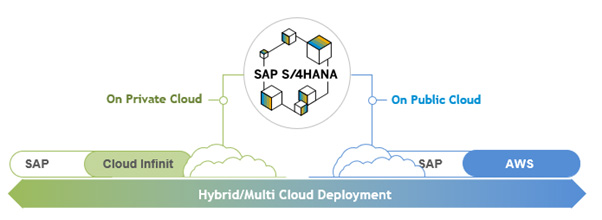
SAP on AWS hybrid cloud solutions
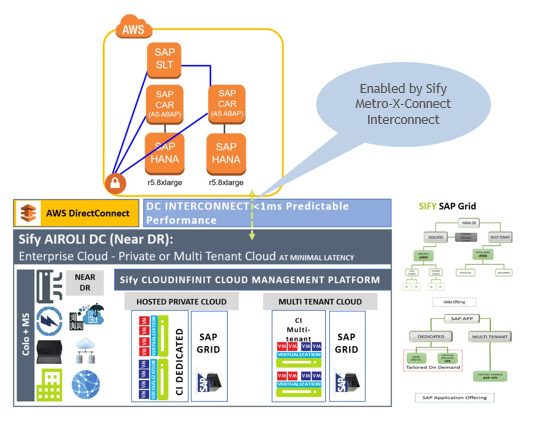
Use Cases
- Lifecycle Distribution: Separate Development and Test Environments
- Workload Distribution
- High Availability Deployments
Business Benefits
- Best of breed performance with Hybrid Cloud configuration
- Efficient integrations with extended ecosystems
- Compliance with data sovereignty
- Business continuity with resilience
- Simplicity with self service
- Operational efficiency with reduced IT administration
- Cost reduction with on-demand bursting to public clouds
Migration methodology
For SAP Migrations from on-premises or from any other Cloud to AWS, depending on various parameters like Prod. database size, available downtime window, source/target operating system/database, connectivity/link speed etc., we have been using various ways for seamless migration briefly explained below.
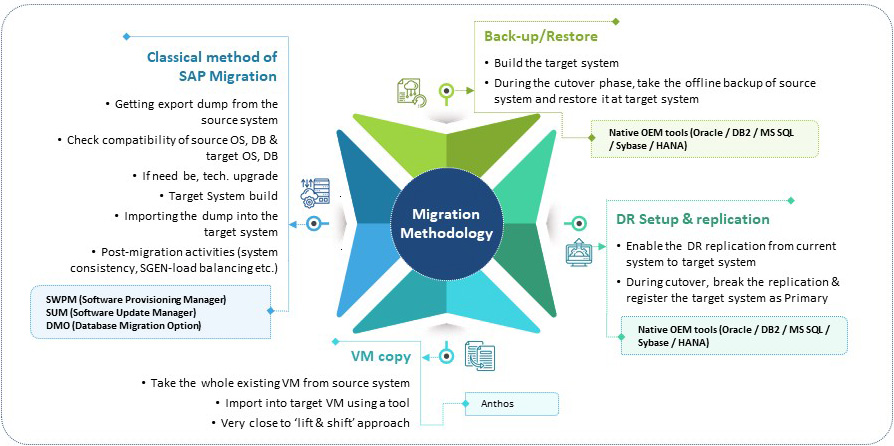
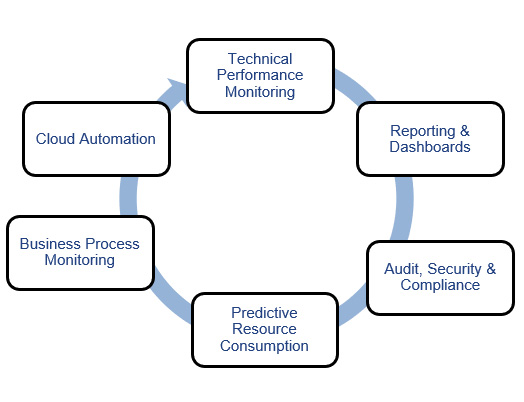
SAP SYSTEMS monitoring
Once SAP workloads are moved to AWS, Sify’s Managed Services takes care of every aspect, including monitoring the Operating System, Database, Connectivity, Security, Backup etc. as per the agreed SLAs. It also monitors the mission-critical SAP systems closely as depicted in diagram below.
Conclusion
Cloud, the scalable, flexible and yet robust hosting platform allows you to use your ERP workloads as well as SaaS applications effectively. Going by the increasing number of customers moving to Cloud, it is certain that Cloud is not vaporware, it is here to stay and only to grow bigger and safer by the day! It would also necessitate organizations to chart out a Smart Cloud strategy.
Embrace the Hybrid Cloud with VMC on AWS
According to Gartner, most of the midsize and enterprise customers will be adopting multi or hybrid cloud services. Companies have already realized that in order to move to the public cloud, it is important to structure workload in a hybrid cloud model.
Companies must understand that hybrid IT is not an easy methodology and therefore they must organize their existing IT resources and application workloads both on-premises and in public cloud efficiently to accomplish the goals of hybrid model. Additionally, they must also look for the right skills for different private/public clouds and different sets of tools from respective cloud and hybrid cloud managed services providers.
At Sify, we define some guidelines and structures to right-fit your workloads in the hybrid cloud. Please read on to know how Sify can help customers identify the right cloud (from the set of appropriate private and/or hosted private cloud services) for different sets of workloads.
Learn why we are one of the most trusted providers of hybrid cloud managed services globally. Read about our hybrid cloud managed services offering to know more.
Unique Challenges in Hybrid Cloud and Hybrid Cloud Services
In hybrid cloud, there are some unique challenges that businesses need to address first. Key challenges that need to be addressed while designing solutions on Hybrid Cloud are mentioned herein.
- Generally, it is very difficult to identify the most suitable cloud environment and manage the cost of different clouds.
- Though all cloud environments are powerful in providing features like scalability and elasticity, however the process of managing a hybrid cloud is quite a complex task.
- Security Risks: The threat of data breach or data loss is perhaps the biggest challenge faced during hybrid cloud adoption. Generally, companies prefer on-premises private clouds to protect data locally. However, in order to ensure top-tier security of data and applications on hybrid cloud, companies must draft robust data protection policies and procedures.
How can you migrate your workloads seamlessly to hybrid cloud? Read about our cloud migration services and hybrid cloud managed services offering to know how we can help.
Identify Applications for Hybrid Cloud
It is very important to identify applications for hybrid cloud, and your decision must be based on application’s architecture, behavior and user accessibility. Below are some key points to remember while designing an effective hybrid cloud strategy: –
- Consider the compatibility of applications before deciding whether you want to continue running the applications in an on-prem cloud environment or migrate them to Public Cloud.
- Identify the running cost/budget for an application and compare it with different cloud providers to choose the most suitable cloud platform that suits your budgetary outlines and business requirements.
- Pay due attention to licensing requirements before migrating to Public/Private Cloud because a minor loophole in this aspect can have a major impact on the overall business.
- Relook experience of existing IT teams to manage different Private/Public clouds seamlessly.
Not sure how to take the first step? Connect with us to explore our proven capabilities in hybrid cloud services, cloud migration services and hybrid cloud managed services. Click here.
Why VMC on AWS as Hybrid Cloud Choice?
VMware Cloud (also called as VMC) on AWS brings VMware’s enterprise-class Software-Defined Data Centre software to the AWS Cloud and enables customers to run production applications across VMware vSphere-based private, public, and hybrid cloud environments, with optimized access to AWS services.
AWS is VMware’s preferred public cloud partner for all vSphere-based workloads. The VMware and AWS partnership delivers a faster, easier, and cost-effective path to the hybrid cloud while allowing customers to modernize applications enabling faster time-to-market and increased innovation.
New Amazon EC2 i3en.metal instances for VMware Cloud on AWS, powered by Intel Xeon Scalable processors, deliver high networking throughput and lower latency so you can migrate data centers to the cloud for rapid data centers evacuation, disaster recovery, and application modernization.
VMC on AWS can be the right choice because VMware has been a trusted virtualization platform for many years in the industry and enterprise VMware ensures that all your applications run seamlessly. Plenty of companies are already running on VMware platform and have applications running on it. Below are some key identifiers for VMC on AWS:
- VMware SDDC is running on bare metal, which is delivered, operated, supported by VMware
- On-demand scalability and flexible consumption
- Full operational consistency with on-premises SDDC
- Seamless workload portability and hybrid operations
- Global AWS footprint, reach, and availability
- Native AWS services accessibility
Explore Sify’s expertise in the hybrid cloud and hybrid cloud managed services space. Click here.
How VMC on AWS Solution Works
VMware Cloud on AWS infrastructure runs on dedicated, single tenant hosts provided by AWS in a single account. Each host is equivalent to an Amazon EC2 I3.metal instance (2 sockets with 18 cores per socket, 512 GiB RAM, and 15.2 TB Raw SSD storage). Each host is capable of running many VMware Virtual Machines (tens to hundreds depending on their compute, memory and storage requirements). Clusters can range from a minimum 3 hosts up to a maximum of 16 hosts per cluster. A single VMware vCenter server is deployed per SDDC environment.
How do We Access AWS Services?
For companies that are using VMware Cloud on AWS (VMC) as a production environment for their business-critical application, it will require connectivity to an AWS account. This is enabled by an AWS elastic network interface which provides a 25Gbps connectivity between VMC and AWS. Applications deployed on VMC can leverage native AWS services for storage, EC2 instances, RDS Databases, load balancing and DNS routing, etc., providing customers with the best of both worlds. These native services can be accessed from applications deployed on VMC and include:
- Simple Storage Service (S3)
- Elastic File Service (EFS)
- Amazon Relational Database Service (RDS)
Sify’s Value Propositions to Help Customer Who are Looking for Hybrid Cloud Services
Sify has been in the Cloud industry since 2012 and has its own cloud for enterprise customers which can be tailored based on the requirement. Over the last few years, Sify has been involved in large enterprise customer requirement understanding, solutions & implementation across Private, Public & Hybrid Clouds.
Sify has dedicated, experienced and certified SMEs involved during solution stage and implementation and to provide operations services which will enable businesses to accelerate the adoption of Hybrid Cloud.
Our approach is to identify potential use cases for Hybrid Cloud options for VMC on AWS and native AWS services during the initial assessment and design phase, and we also suggest the most suitable services that can help customers meet the strategic goals. These services include the following:
- Discovery Workshop
- Assessment
- Build and Migrate
Feel free to contact us to provide your organization with tailored solutions with the required support across the various stages of the setup of VMC & AWS and migration of workloads.